Premium

Reverse percentages calculator app

Work backwards to the original value. Available with Premium in The Percentage Calculator app.

A monthly plan or lifetime Premium purchase is required for this feature.

PREMIUM IN THE MOBILE APP

Find the price before a reduction.

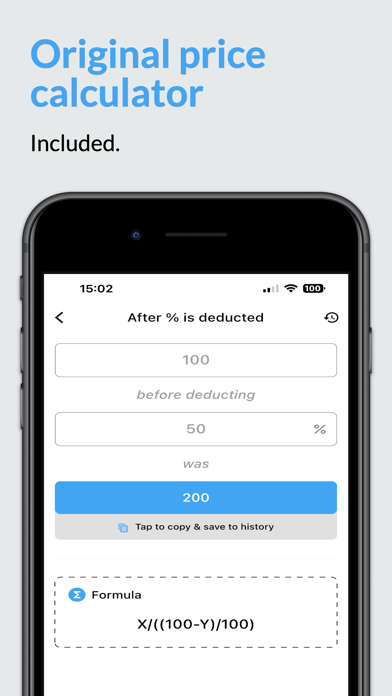
The iOS reverse percentage screen shows the amount after a deduction, the percentage deducted and the original value. Use Premium to work backwards with your own figures.

  1. Choose reverse percentages

    For a reduction, use the mode labelled “After % is deducted” in the iOS app.

  2. Enter the final amount and reduction

    The official screen shows 100 after a 50% deduction. Entering those values recovers an original amount of 200.

  3. Check the original amount

    The displayed formula divides the final amount by the share remaining. The result control offers copy and save to history.

Compare Free & Premium

Store listings: App Store and Google Play.

Official iOS reverse percentage screen: 100 after a 50% deduction gives an original value of 200
iOS app screenshot · App Store
UNDERSTAND THE CALCULATION

Reverse percentages formula

After a reduction of p%, divide the final value by (1 − p/100). After an increase, divide by (1 + p/100).

What to keep in mind

Recovering a discounted price is different from adding the same percentage back. Adding 20% to 80 gives 96, not the original 100. A 100% reduction cannot be reversed from the final value alone.

Find the original amount before a percentage change

A reverse percentage calculation starts with the final amount and a known rate of change. Your first step is to identify what percentage of the original remains. After a 20% decrease, the final amount is 80% of the original. After a 20% increase, it is 120%.

Known changeReverse formulaWorked example
Decrease of p%original = final ÷ (1 − p/100)80 ÷ 0.80 = 100
Increase of p%original = final ÷ (1 + p/100)120 ÷ 1.20 = 100

The increase or decrease must describe the change applied to the original amount. A percentage describing a different base requires a different equation.

Recover a price or a starting salary

A sale price of 72 after a 10% discount came from 72 ÷ 0.90 = 80. Check it by reducing 80 by 10%, which subtracts 8 and leaves 72.

A salary of 2,100 after a 5% raise came from 2,100 ÷ 1.05 = 2,000. Subtracting 5% from 2,100 would give 1,995 because that subtraction uses the new salary as its base.

When several percentage changes were applied, reverse their combined multiplier. A value of 108 after a 20% increase followed by a 10% decrease came from 108 ÷ (1.20 × 0.90) = 100.

When a reverse percentage has no unique answer

A 100% reduction leaves zero whatever the original positive amount was. You cannot recover a unique original from that final value alone. The reverse formula would require division by zero.

Rounding can also limit precision. If a displayed sale price or percentage has been rounded, the recovered original is an estimate consistent with those inputs.

If you know a part and the percentage it represents directly, use the free find the whole calculator. If both the starting and final amounts are known, use percentage change to find the rate.
KNOW BEFORE YOU DOWNLOAD

Frequently asked
questions.

How is this different from finding the whole?

Finding the whole starts with a part and the percentage it represents. Reverse percentages starts with an amount after a known increase or decrease.

Where can I work backwards from my final price?

Download the app and unlock Premium for reverse percentages. The examples here explain the method; the four core percentage modes are free online and in the app.

Why can’t I add the discount back to the sale price?

The original discount was taken from a larger base. After 20% off 100, the sale price is 80. Adding 20% of 80 gives only 96. Divide by the remaining share, 0.80, to recover 100.

How do I undo a percentage increase?

Divide the final value by one plus the rate as a decimal. For a final value of 120 after a 20% increase, calculate 120 ÷ 1.20 = 100.